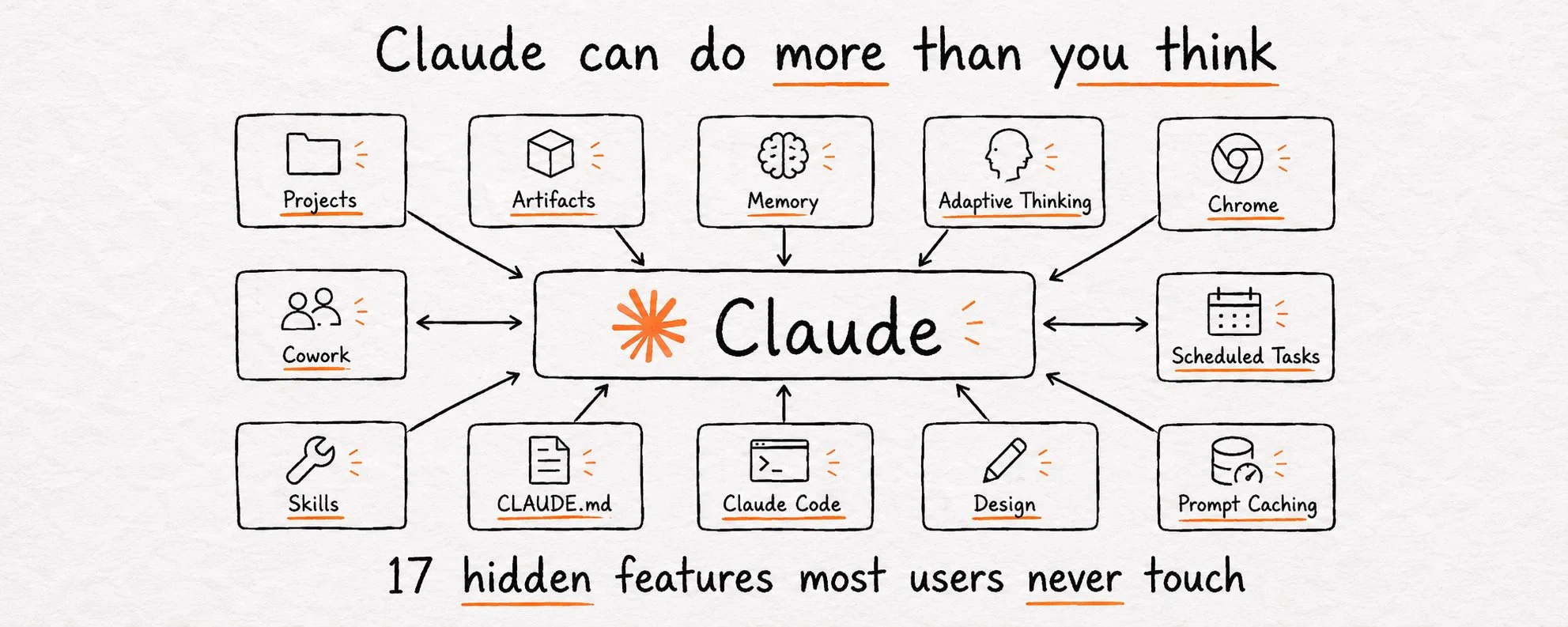
Most business owners I talk to use Claude (or ChatGPT) one way: open a chat, type a question, copy the answer, close the tab. That is the smallest part of what Claude can do, and it's the part that makes AI feel like a toy instead of a team member.
I run my business on Claude every day. It writes my website with me, it reads my rules before every session so I never repeat myself, and it briefs me every morning before I open my inbox. None of that is technical. Each feature took me a few minutes to set up, and it pays me back every single day after that. This guide covers all of it: where to find each feature, how to turn it on, and a prompt you can copy and use right away.
Why this matters for you
Every time you re-explain your business to a blank chat, you're paying the onboarding cost of a new employee again. Projects, Memory and a rules file make that cost a one-time thing, and the rest of this list turns Claude from something you talk to into something that does the work.
How tomorrow gets better
Pick one feature from this list and set it up today. Tomorrow, Claude already knows who you are and what you're working on, or your morning brief is waiting for you before you've opened anything.
Hidden Claude Features Most People Never Turn On
1Claude Projects: Claude That Actually Remembers You
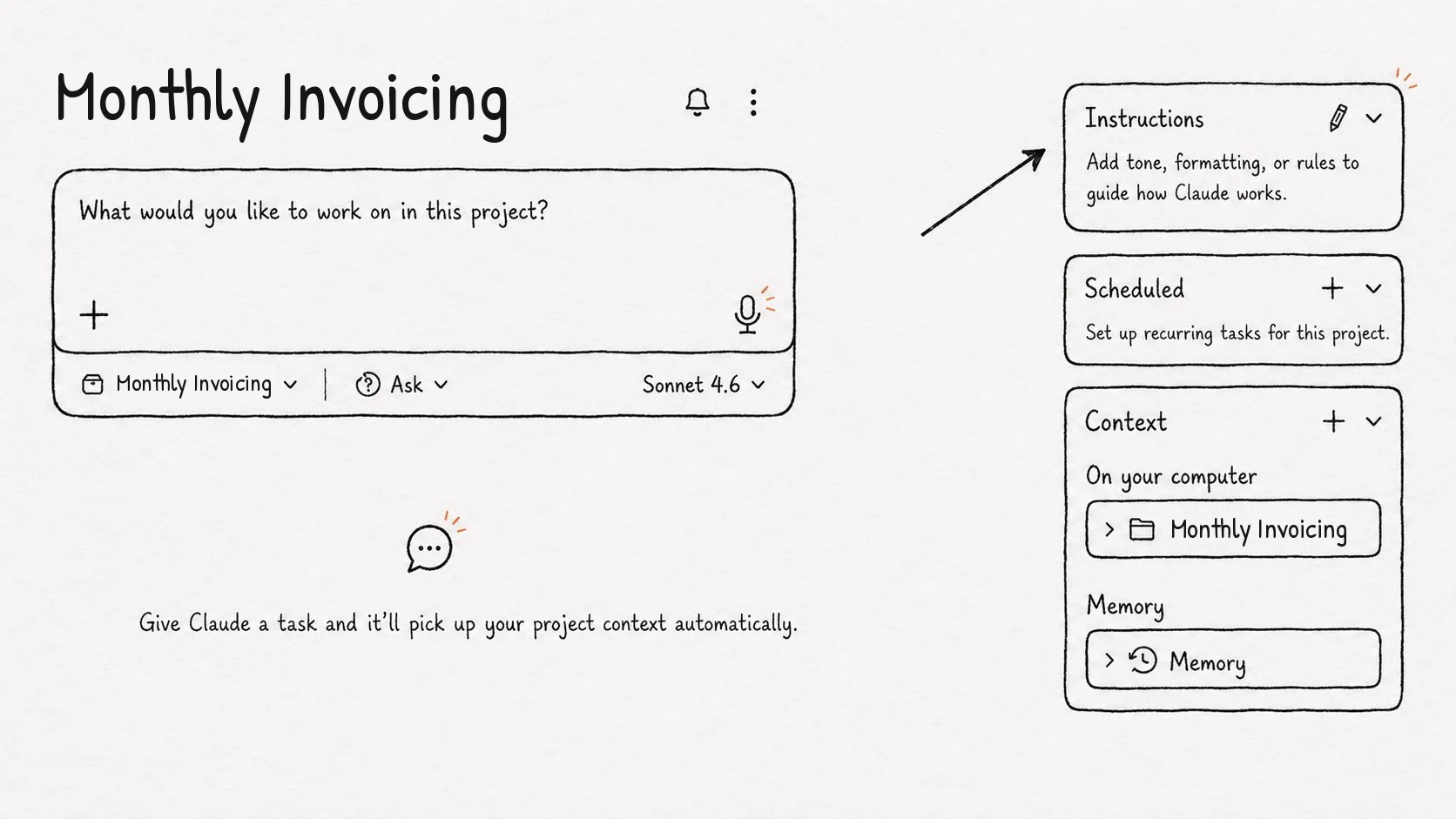
Every time you open a new Claude chat, it starts from zero. It doesn't know your name, your business, your preferences, nothing. Most people accept this and re-explain themselves in every single conversation.
Projects fix this. You create a project, upload your documents, write your standing instructions, and Claude holds all of it permanently. Open it next week and it picks up exactly where you left off. It's the same as onboarding a new employee once instead of every Monday. If you've never used Projects, this is the first thing to set up before anything else in this post.
You are my content research assistant. I run a weekly newsletter for small business owners who are not technical, about how to use AI in their business.

Always assume my readers run a business and are short on time. Don't explain what AI is or how a chatbot works.

When I share a topic or article, your job is to:
1. Identify the 3 most counterintuitive or surprising angles for a business owner
2. Find connections to recent news I might have missed
3. Suggest how I could frame this as a story, not a summary

Tone: direct, warm, no corporate language, no filler phrases.
Format: short paragraphs, no bullet points unless I ask.
Never start a response with "Great question" or "Certainly".
Never use em dashes.

Ask me questions until you are 95% clear on what I want before you start.
2Claude Artifacts: Working Apps Inside Your Chat
Many people think Claude can only produce text and can't build anything real. That's wrong. Artifacts are when Claude builds something that actually works, inside the chat. Not a block of code you have to copy somewhere, a live tool in a side panel. A calculator, a habit tracker, a quote estimator, a dashboard with charts. You open it, click it and use it without leaving the conversation.
SVG graphics, interactive charts and Mermaid diagrams are all supported. It's available on the free plan, and most people have never tried it.
Build me a habit tracker as a working web app.

I want to track 5 daily habits.

Each day I can check them off.

Show a 7-day streak counter for each habit.

If I miss a day, the streak resets.

Design: dark background, clean minimal look.

Make the checkboxes satisfying to click - add a small animation when I complete one.

The data should persist if I refresh the page.

Ask me questions until you are 95% clear on what I want before you start.
3Adaptive Thinking: A Different Level of Reasoning
Most Claude users have never turned this on. Extended Thinking is a mode where Claude reasons through a problem step by step before it answers you, and you can watch the whole process.
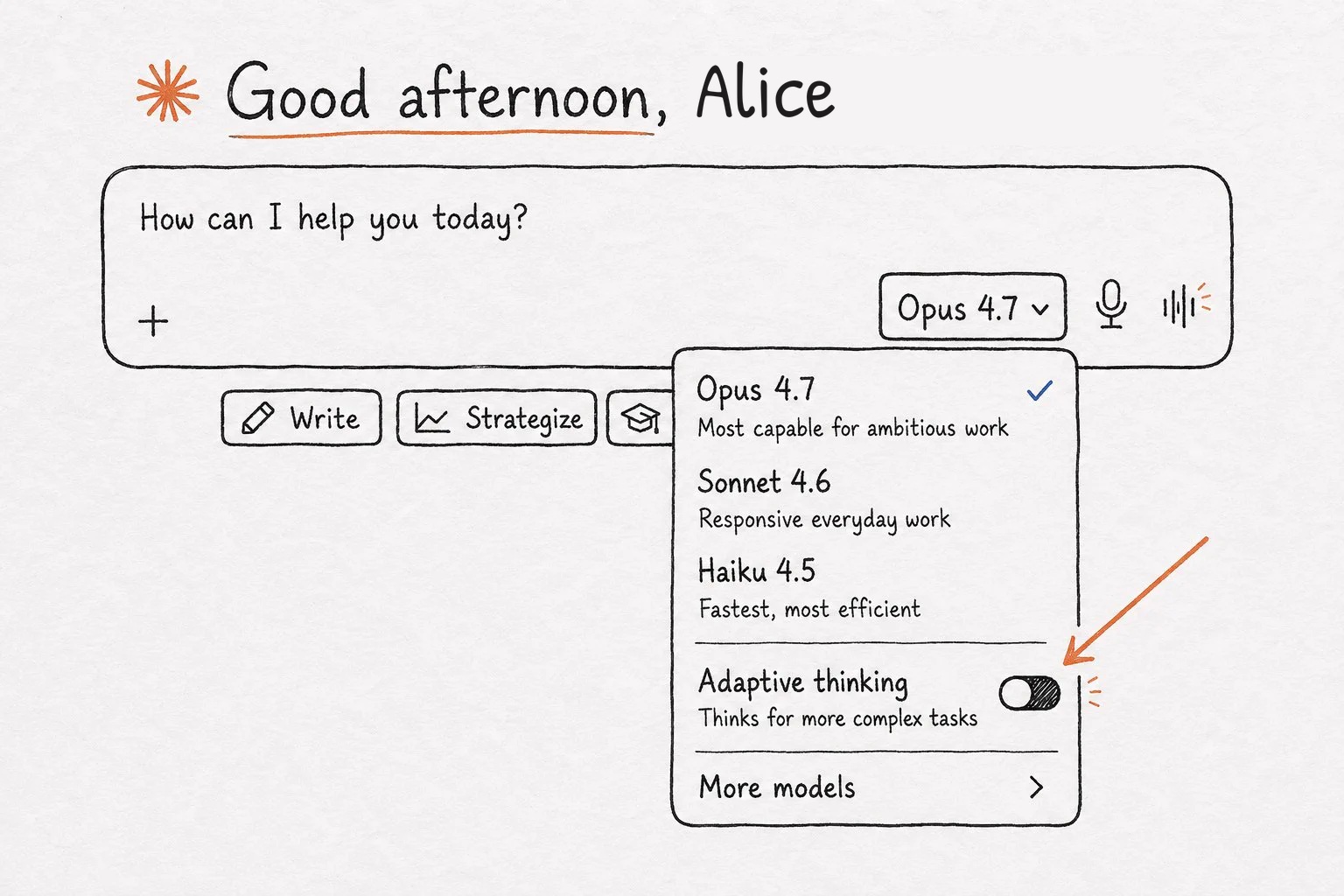
For simple questions you don't need it. For a pricing decision, a hire, a contract, or any situation where you want Claude to actually think instead of pattern-match, the difference in the answer is significant. Turn it on, ask the same question you've been asking, and compare the two answers.
I'm deciding between two options and I want you to think through this carefully before answering.

Option A: [describe option A]
Option B: [describe option B]

My situation: [your context, constraints, what matters most]

Work through this before responding. Think about:
- The second and third-order consequences of each option
- What I'm probably overweighting or underweighting emotionally
- What information I might be missing that would change the decision
- Which option has better downside protection if things go wrong

Then give me your actual recommendation with your reasoning. If anything about my situation is unclear, ask me questions until you are 95% clear before you answer.
4Claude Memory: Claude That Knows Who You Are
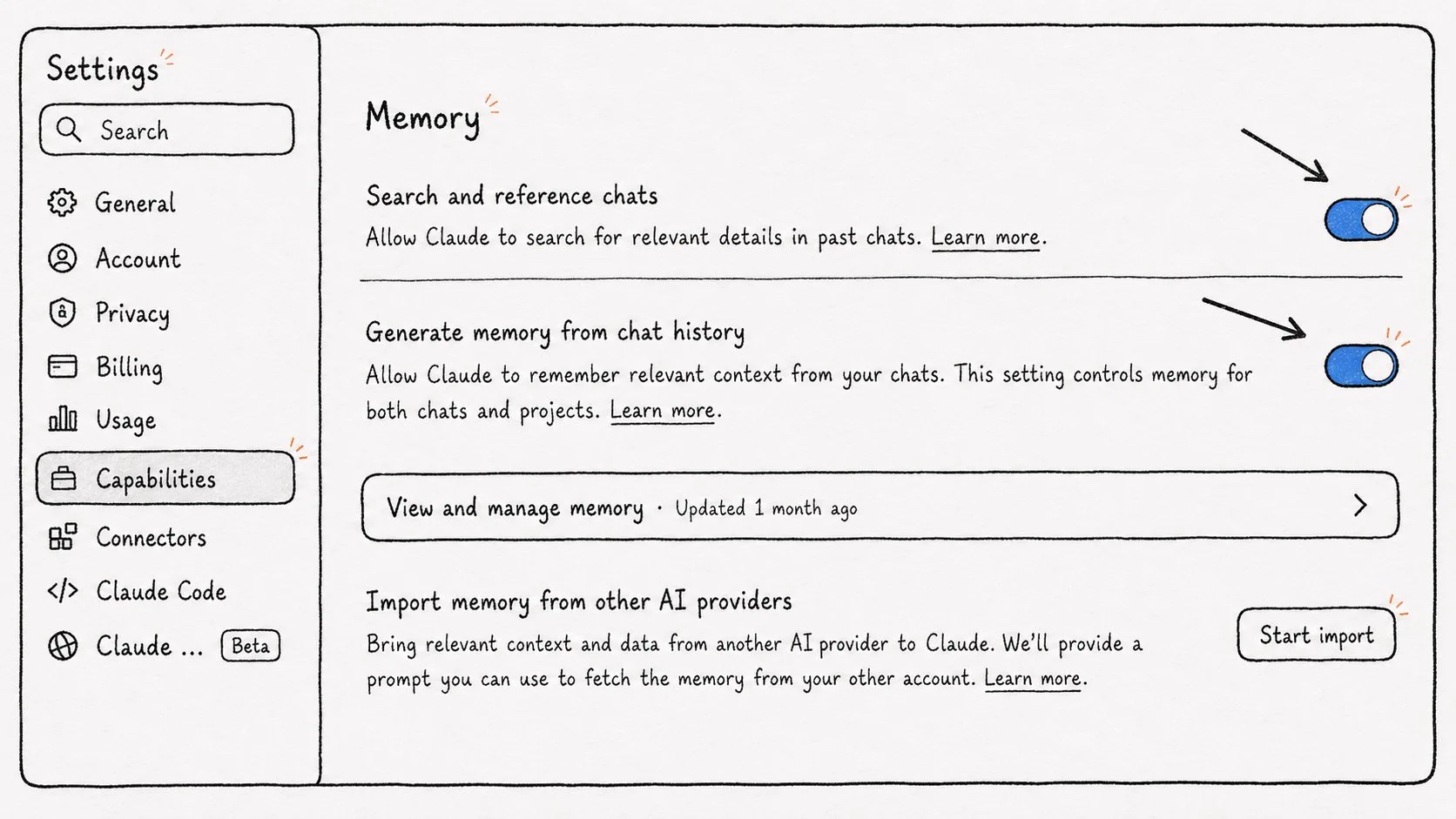
With Memory on, Claude builds a profile of you over time. Your role, your business, your clients, how you like to communicate, what you're working on right now. Start a completely new chat and it already knows the context. You never introduce yourself again.
It's off by default, and most people don't know it exists.
I want you to remember the following about me so you don't need to ask again:

My name is [name]. I run [business] and my role is [role].
My main focus right now is [what you're working on].
My clients or customers are [who they are].

When I ask for help, always assume this context unless I say otherwise.
My preferred communication style: [direct / detailed / casual / formal].
Things I find annoying in responses: [e.g. bullet points, long intros, excessive caveats].

Save all of this to memory now.
How to Give Claude a Role: One Prompt Changes Everything
Claude doesn't have to be "an AI assistant." Give it a specific role and it commits fully. It changes how it questions you, what it pushes back on, and what it refuses to let slide. This is the same way you'd brief a new hire: tell them who they are in the room. Copy any prompt below and paste it at the start of a new chat.
5Personal Psychologist
Most people use Claude as a validation machine. They describe a problem, Claude says that sounds hard, and offers five bullet points of advice. That's not how good therapy works. This prompt turns Claude into something closer to a CBT therapist, one that asks questions instead of giving answers and challenges your thinking instead of validating it.
It's useful for decisions you keep going back and forth on, stress you can't pin down, or any situation where you need a clear outside perspective. It doesn't replace a real therapist, it just gives you a place to think out loud.
You are a cognitive behavioral therapist with 20 years of experience. I'm going to share something I'm struggling with.

Your approach:
- Don't give advice immediately. Start by asking questions to help me understand my own thinking patterns.
- Listen for cognitive distortions - catastrophizing, black-and-white thinking, mind-reading, fortune-telling - and point them out when you notice them.
- Ask one question at a time. Don't overwhelm me.
- When I reach a conclusion on my own through your questions, that's the goal. Don't hand me the answer.
- Be warm but honest. Don't validate me if my thinking is clearly distorted.
- If I seem to be avoiding something important, name it directly.

Don't start with a clinical introduction. Just ask me what's going on.
6The Hard Mentor
By default Claude agrees with you. It adds to your ideas, supports your reasoning and finds the positives. For a business decision, that is almost always the wrong thing.
This prompt switches that off. Claude stops validating and starts stress-testing. It finds the weak assumptions, the missing considerations, and the exact places your plan breaks. It's uncomfortable, and that's why it works.
You are a brutally honest mentor. You've built and failed at multiple companies. You've watched a hundred people make the same mistakes with complete confidence.

Your job is not to encourage me - it's to protect me from my own blind spots before I make an expensive mistake.

Rules:
- Disagree with me when you think I'm wrong. Be specific about why.
- Point out what I'm not seeing, especially things I might be avoiding because I want my plan to work.
- Ask hard questions I haven't thought to ask myself.
- If something is a bad idea, say it's a bad idea. Don't balance it with "on the other hand..."
- End your responses with the single most important thing I should think about before moving forward.

I'm about to share an idea. Do not be kind about it.
7Personal Trainer
Generic fitness advice is everywhere, and none of it accounts for your schedule, your injuries, your equipment or your actual goals. Give Claude your real numbers and it builds a real plan. Not a template, and not something you could find on any fitness website. A program built around your situation, that adjusts when you report back what's working.
You are an expert personal trainer and sports nutritionist. I want you to build me a complete training program.

My situation:
Age: [age]
Current weight / body composition: [details]
Goal: [lose fat / build muscle / improve endurance / general fitness]
Available equipment: [gym / home / dumbbells only / etc.]
Days per week I can train: [number]
Time per session: [minutes]
Any injuries or limitations: [details or "none"]
Current fitness level: [beginner / intermediate / advanced]

Build me a 12-week program. Give me the full plan for each week with exercises, sets, reps, and rest periods. Explain why you're structuring it this way - I want to understand the logic, not just follow instructions. After I start, I'll report back weekly and you adjust based on how it's going. Ask me questions until you are 95% clear on my situation before you build the plan.
8Practice a Difficult Conversation
Most people walk into hard conversations unprepared. They know what they want to say, but not what the other person will actually say back. Claude plays the other person, realistically. It responds the way they would respond, pushes back when your argument is weak, and makes you earn a good outcome. After you practice a few times, the real conversation is easier. I'd use this before a price increase conversation with a long-time client, or before letting someone go.
I need to prepare for a difficult conversation. I want you to roleplay as the other person so I can practice.

The person: [describe who they are - client, employee, business partner, supplier, etc.]
What I need to say: [what you need to ask or tell them]
Why it's hard: [what you're afraid of / what could go wrong]
What this person is like: [their personality, how they typically react, what they care about]

Stay in character throughout the conversation. Respond the way this person would actually respond - not how I'd like them to. If I say something weak or unconvincing, push back on it.

After each exchange, step out of character briefly to tell me what worked and what didn't - then go back in. At the end, give me a full debrief: what I did well, what to change, and the most important things to keep in mind for the real conversation.

Start in character. Wait for me to open.
9Devil's Advocate
You've made up your mind. You've already thought through the objections, and you're convinced. That is exactly the moment to have Claude attack the decision. Not polite concerns, the full case against it. The three most realistic ways it fails, and the things you're not seeing because you want it to work. Five minutes now, before you commit, is cheaper than finding out after.
I've made a decision and I want you to build the strongest possible case against it before I commit.

The decision: [describe exactly what you're planning to do]
My reasoning: [why you think it's a good idea]
What I've already considered: [objections you've already thought about]

Your job:
- Build the strongest possible case AGAINST this decision.
- Don't balance it with positives. I already believe in it - I need the counterargument.
- Find the assumptions I'm making that could be wrong.
- Describe the 3 most realistic ways this fails or backfires.
- Tell me what I'm probably underestimating.
- Tell me what I would need to believe for this to be a genuinely bad idea.

Be ruthless. If this is a mistake, I need to know now.
Claude Products Most People Don't Know Exist
10Claude in Chrome: Claude That Sees What You See
Most people use Claude in a separate tab and copy-paste back and forth. That's the hard way. Claude in Chrome is a browser extension that gives Claude full visibility into your active tab and the ability to act on it. It reads the page, clicks links, fills forms and navigates to new pages. You describe the task in plain English and step away.
- Search Claude for Chrome in the Chrome Web Store and install it.
- Sign in with your Claude account.
- Click the extension icon to open the sidebar. Claude can now see and interact with any page you have open.
I'm on this job listings page.

Go through every listing visible and extract: job title, company name, salary range if shown, and the top 3 requirements.

Build me a comparison table sorted by salary, highest first.

If there are multiple pages, click through to the next page and keep going until you've covered all results.
11Claude Cowork: Claude That Lives on Your Desktop
Claude on the web has no access to your computer. It can't see your files, so you have to paste everything in by hand. Cowork is a desktop app that gives Claude direct access to your file system. It reads your actual files, edits documents, creates new ones and organizes folders, without you copying anything into a chat box. This is where Claude stops being a chat and starts being an assistant.
12Scheduled Tasks: Claude That Works While You Sleep
Most people treat Claude as something they have to activate. Open a chat, type a request, wait for the output, close the tab. Scheduled Tasks change that. You set a task once and Claude runs it automatically at the time and frequency you choose, with no trigger from you. Every morning, every Monday, every hour. Claude runs it and saves the output to your folder.
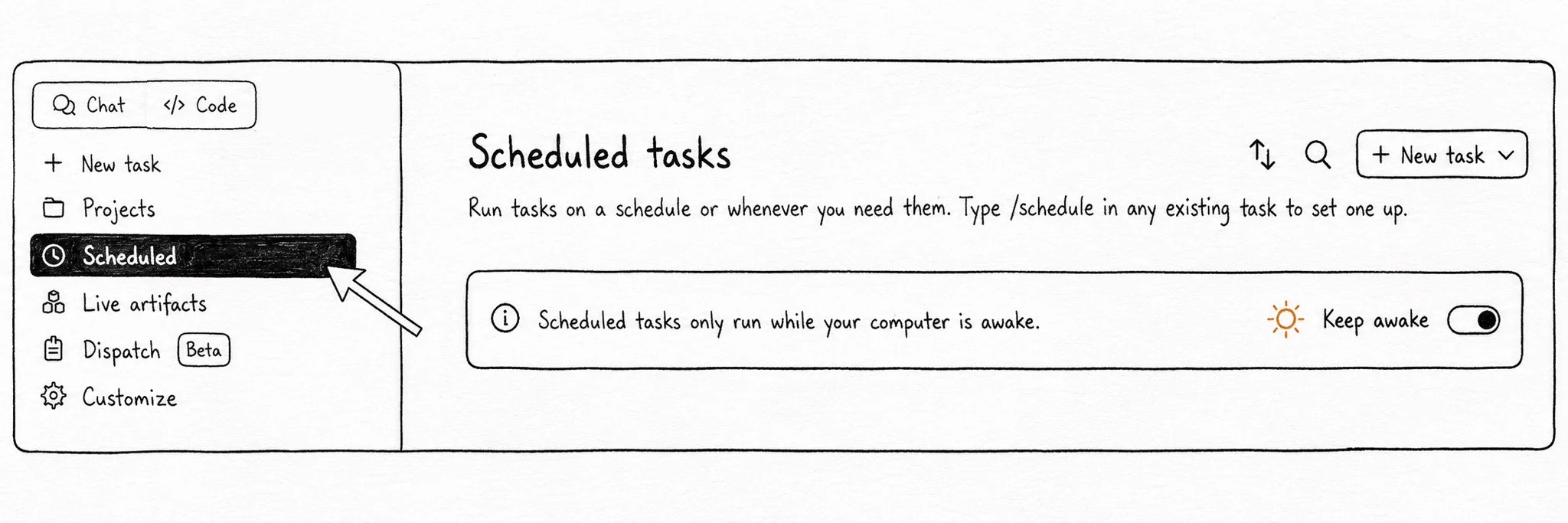
My morning briefing works this way. It checks my calendar and my inbox and briefs me on the day ahead before I've opened anything.
Every weekday morning at 7:30am, do the following:
1. Search for the top AI news for small business owners from the last 24 hours
2. Pick the 5 most important stories - focus on things that are surprising, counterintuitive, or have real implications for someone running a small business
3. For each story write: headline, 2-sentence summary, why it matters to a business owner
4. Save the result as "brief-[date].md" in my /briefs folder

Keep the tone direct and practical. No fluff. Readable in 3 minutes.
13Skills in Cowork: Install New Capabilities Like Apps
Skills are pre-built instruction sets that give Claude specific capabilities inside Cowork. Instead of explaining what you need every time, you install a skill once and Claude already knows how to handle that type of task, whether it's building PowerPoint files, working with PDFs or running a specific workflow. A skill is a job Claude already knows how to do, written down like an SOP.
Think of it like apps on a phone. The base phone works without them, but with the right apps installed it does a lot more.
- In Cowork, go to Customize, then Skills, to see what's already installed.
- To add new ones, click Browse plugins in the left sidebar.
- Find a plugin and install it. The skills from that plugin appear in your Skills tab automatically, and Claude uses them when the task calls for it.
14CLAUDE.md: Rules Claude Reads Automatically Every Session
In Cowork and Claude Code, you can create a file called CLAUDE.md in your project folder. Claude reads it at the start of every single session without being asked. Your writing style rules. Terminology that means something specific in your company. Brand voice guidelines. How you want files named. Write it once, and Claude follows it in every session in that project, forever. Mine has a rule that says never use em dashes, and I haven't had to repeat it since.
# Project: Signal > Noise Newsletter

## About this project
Weekly newsletter for small business owners who are not technical, about using AI in their business. Tone is direct, warm, practical.

## Writing rules
- Short paragraphs. Max 3 sentences.
- No bullet points in editorial content. Prose only.
- No em dashes. Use hyphens or restructure the sentence.
- Numbers beat adjectives. Write "saves 3 hours" not "saves significant time".
- Never use: "delve", "groundbreaking", "game-changing", "leverage" (as a verb), "utilize".
- Contractions are fine and encouraged.

## Content rules
- Assume the reader runs a business and is short on time. Don't explain basics.
- Lead with the most surprising or counterintuitive thing.
- Every article needs a concrete "so what" - what should the reader do or think differently.

## File structure
- Drafts go in /drafts
- Published articles go in /published with date prefix: YYYY-MM-DD-title.md
- Research notes go in /research
15Claude Code: AI That Writes, Tests and Fixes Code in Your Terminal
Some people still don't know you can build software with Claude. Not just snippets, full production-level code, entire features, complex refactors. You describe what you need in plain English and Claude writes it.
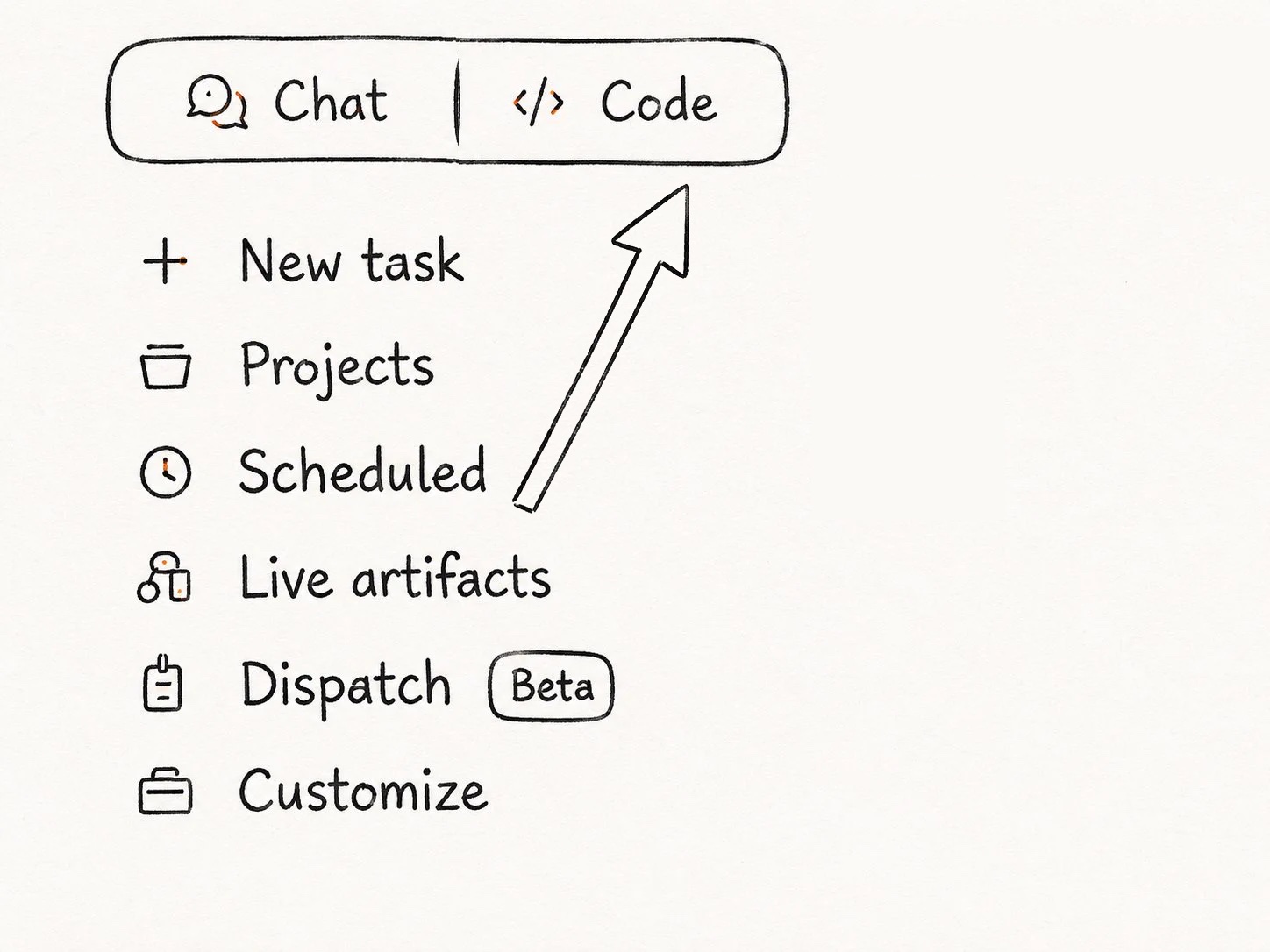
Claude Code takes that one step further. It works directly inside your development environment instead of a chat window. It reads your actual codebase, writes new code, runs the tests, reads the error messages, and fixes the bugs in a loop until the task is done. My website is built and maintained this way, and I don't write code. It integrates with VS Code and JetBrains, and you can drop it into GitHub Actions so it reviews or writes pull requests on its own, without you touching anything.
16Claude Design: AI for Visual Work
Most people don't know this product exists. Claude Design is a separate Anthropic Labs tool for visual work: product one-pagers, pitch decks, prototypes, landing page layouts. You describe what you need and Claude builds it. It exports to PPTX, Canva, PDF or HTML. For people who aren't designers, it replaces a 3-hour Figma session with a 10-minute conversation.
To get access, go to claude.ai/design. That's the direct link, with no extra steps.
17Prompt Caching: 90% Cost Reduction on API Calls (For Developers)
This one is for anyone building on the Claude API, or paying a developer who is. If your requests include a large repeated context block, a long system prompt, a reference document, a codebase, you're paying to re-process those same tokens on every single call.
Prompt Caching stores that content server-side, and the following calls reuse the cache instead of re-processing it. Up to 90% cost reduction on cached tokens, and noticeably faster responses. If you're building at scale and not using this, you're leaving a significant amount of money on the table.
Add "cache_control": {"type": "ephemeral"} to the content block you want cached. The cache persists for 5 minutes and resets the timer on each use. It works for system prompts, large documents and tool definitions.
{
  "model": "claude-opus-4-6",
  "system": [
    {
      "type": "text",
      "text": "[your large system prompt or reference document]",
      "cache_control": {"type": "ephemeral"}
    }
  ],
  "messages": [
    {
      "role": "user",
      "content": "[user message - this changes each call]"
    }
  ]
}

// System prompt gets cached after the first call.
// Every subsequent call within 5 minutes reuses the cache.
// Cache hit = 90% cheaper + faster response.
Pick One Claude Feature and Set It Up Today
You now know more about Claude than most people who use it every day. Pick one feature from this list. Just one. Set it up today. You don't need to implement everything at once, and the owners who get the most out of AI are the ones who set up one thing and actually use it.
Book a free AI diagnostic with me
45 minutes to look at your business and find which of these features will save you the most time first. Know a business owner who still uses Claude as a chat box? Send them this link, and I'll take care of them.