
Stop writing invoices by hand. I run my whole month's invoicing with Claude in about ten minutes, and it is only the first of four month-end jobs I hand to AI.
I am a solo founder. No accountant on staff, no bookkeeper, no code. And yet month-end no longer eats my weekend. In the video below I walk through the exact Claude AI workflow I use to close out a month for my small business:
- Invoicing
- My quarterly business audit
- Content reporting
- My monthly financial report
All of it, in under an hour. If the last few days of the month usually swallow your Saturday, this one is for you.
I set these up as recurring jobs so they run themselves on a schedule: Claude Cowork Scheduled Tasks if you work in the Claude desktop app, or Claude Code Routine tasks if you work in Claude Code. You teach the job once, then it shows up on the day you pick and does the first pass for you.
The big idea underneath all four: you give Claude your real business information and ask it to think with you, not just for you. That is how a non-technical owner runs month-end with AI. Watch the full walkthrough, then follow the same four steps below.
Watch on YouTube: How I Run Month-End With Claude AI. About 15 minutes, all four workflows step by step.
The Four Jobs That Make Up My Month-End
Month-end is not one big scary task. It is four small ones stacked on top of each other, and each one is a clean fit for AI because it repeats every single month. Here is the whole close at a glance.
Draft the month's invoices, chase anything overdue, and keep a clean record of who owes what. The job that used to eat the most time.
Every three months, a full look back across SEO, offers, pricing, and marketing that tells me where I actually made progress and where I stalled.
Turn last month's content numbers into a single decision: what worked, and what to make more of next month.
A plain-English summary of money in, money out, and what it means, no spreadsheet formulas required.
You do not automate "month-end." You hand Claude four repeating jobs, one at a time, and review the output. The repetition is exactly what makes each one worth handing off.
1. Invoicing in About Ten Minutes
This is the one that used to cost me the most. Copying last month's invoice, changing the dates, changing the line items, catching the one number I always got wrong, then remembering who still had not paid. Now I give Claude the details and it drafts every invoice for me, formatted and consistent.
Then comes the part people forget: chasing. I ask Claude to look at who is overdue and draft a polite reminder for each one, in my voice, without double-sending anyone who already paid. I read them, I approve them, they go out. What used to be a dreaded afternoon is now a ten-minute review.

Here are this month's clients, hours, and rates. Draft an invoice for each in my standard format. Then list anyone whose previous invoice is more than 7 days overdue and write a short, friendly reminder for each. Do not include anyone already marked paid.
Claude drafts the invoice and the reminder. You send it. Keep a human gate on anything that lands in a client's inbox, and never paste bank logins or full card numbers into a chat. It needs the amounts and the names, not your credentials.
2. The Quarterly Business Audit
This is the one I would never have made time for on my own, and it is the most valuable. Once a quarter I ask Claude to look back across the last three months and tell me the truth: where did I actually make progress, where did I say I would do something and quietly not, and what is worth doubling down on.
I do not keep it vague. I point it at four specific parts of the business and ask for a letter grade on each, so I get an honest scorecard instead of a pep talk. Because it has my monthly reports to work from, it connects the dots I miss when my head is down in the day-to-day. Here is the template I use, simplified so you can drop in your own details.
You are running a quarterly business audit for my business, [your business + website] in the [your niche] space. Audit these four areas and give each a letter grade, A to F, with the reasons:
1. SEO. Visit my site and check meta tags, structured data, sitemap, headings, alt text, and internal links. Search Google for my name and my main keywords to see how visible I am, and flag anything broken.
2. Offers. Catalog every offer, free and paid. Map the ladder from lead magnet to core offer to upsell, and find the gaps and dead ends.
3. Pricing. List my prices, compare them to competitors in my space, and tell me whether I have the right tiers for different buyers.
4. Marketing. Look at my social profiles and blog: follower counts, posting cadence, engagement, and topics. Assess how discoverable I am versus how good the content is.
Then build me a short, branded slide deck of the findings in my brand colors, with the grade for each area and the top fixes.
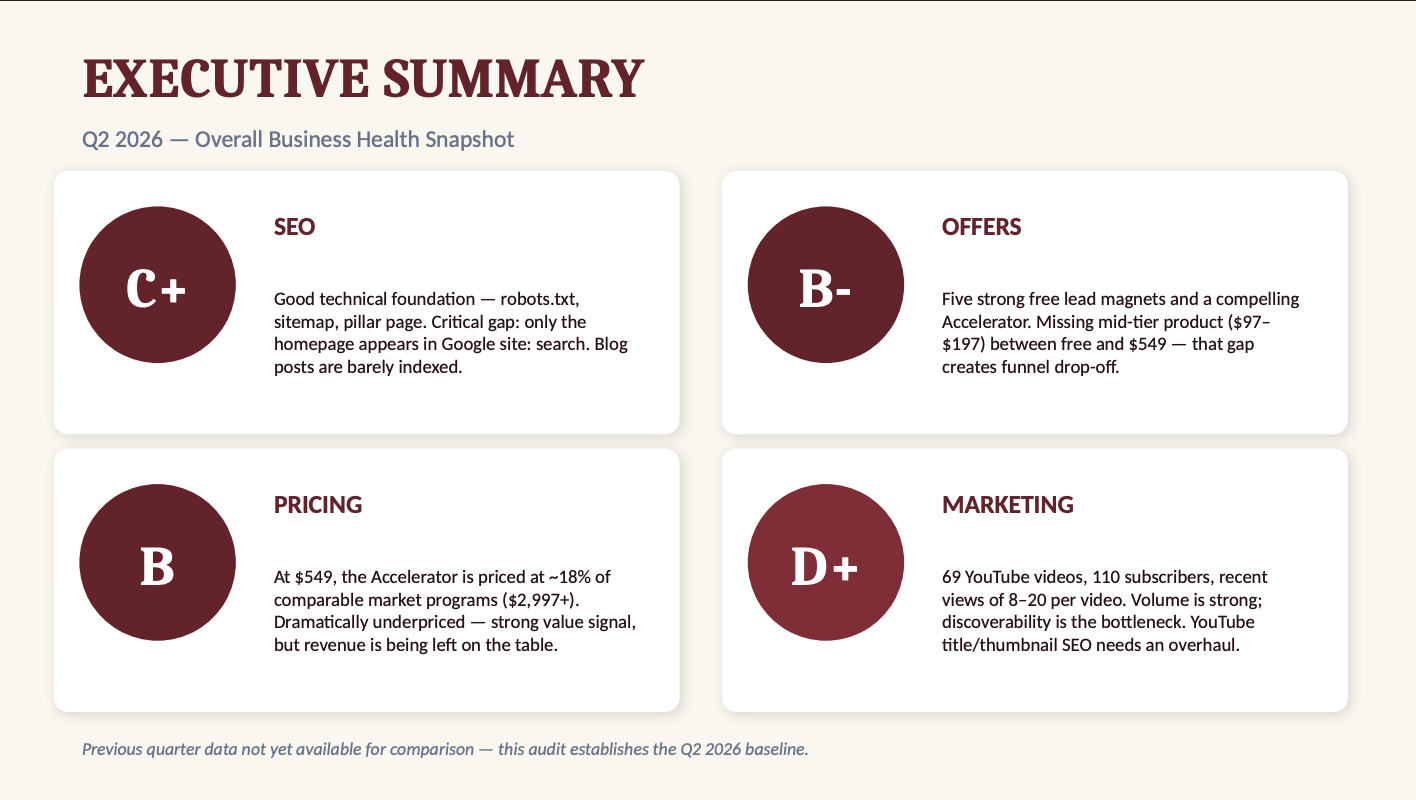
The monthly jobs keep you organized. The quarterly audit keeps you honest. It is the one that turns a pile of admin into an actual view of whether your business is growing.
3. Turning Content Numbers Into One Decision
The audit tells you the marketing grade. The content report is where you act on it. Most owners either ignore their content numbers or drown in them, and neither helps. The point is not a wall of stats, it is a single answer: what should I make more of next month?
I keep all of it in one place: a Content Hub that pulls my numbers straight from my socials, YouTube, LinkedIn, and the rest, so they are live and I am not exporting spreadsheets. Then I ask Claude to read it and find the pattern, not "here are your stats," but "here is what your audience is telling you." It comes back with the two or three themes that actually landed and a short list of what to make next.
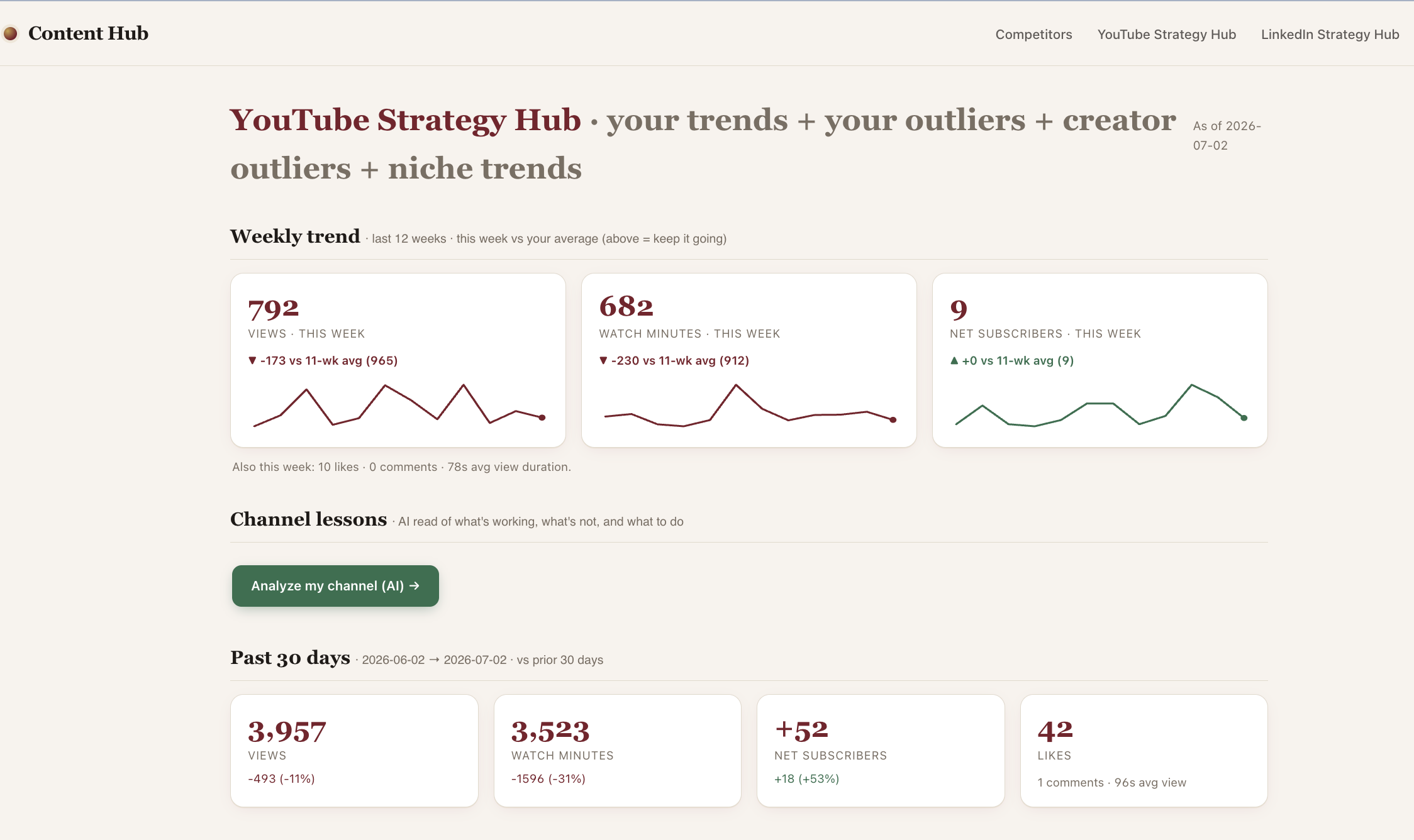
"A report you do not act on is just decoration. Ask AI for the decision, not the dashboard."
4. A Plain-English Monthly Financial Report
You do not need to be an accountant to know where your money went last month. You need someone to read the numbers back to you in plain English. That is a perfect job for Claude.
I give it the month's income and expenses and ask for a short report: what came in, what went out, what changed from last month, and anything worth a second look. No formulas, no pivot tables. It writes the summary a bookkeeper would talk you through, and I get it in a couple of minutes. When it is time to talk to my actual accountant, I hand them clean, organized numbers instead of a shoebox.
Send a monthly PDF report that shows the changes in my income and my expenses for the month. Write a plain-English summary: end of month vs beginning of month, the difference, how that compares to last month, what drove the change, and the three things I should pay attention to. No jargon. Ask me clarifying questions to set this up to run on the 1st of every month, evaluating the previous month.
Setting It Up So It Works Every Month
The first month takes longer, because you are teaching Claude your business. After that, you are mostly reviewing. Here is how to make it stick:
- Give Claude your context once. Your services, your rates, your invoice format, your voice. Save it so every month starts from what it already knows about you.
- Do the jobs in order: invoicing, content report, financial report. The audit runs on top of them once a quarter.
- Read everything before it goes out. You approve; Claude drafts. That split is what keeps it safe.
- Keep the same prompts month to month. Consistency is what turns this from a novelty into a routine.
All of this runs inside the Claude Desktop app. If yours is not set up yet, start with the Claude Desktop setup guide for your business. And once your prompts are dialed in, save them as a skill (here is how to build one) so they fire the same way every month.
What to lean into, and what to leave to your accountant and to yourself:
Hand to Claude
- Drafting and formatting invoices
- Writing overdue reminders in your voice
- Turning numbers into a plain-English report
- Spotting the pattern in your content
Keep with a human
- Filing taxes and compliance (your accountant)
- The final send on anything client-facing
- Bank logins and card numbers, never pasted
- The call on what the numbers mean for you
It replaces the hours you lose to admin, chasing invoices, and pulling a quarter together. Your accountant still handles filing, tax strategy, and compliance. This just means you hand them something clean.
Claude does not decide what matters in your business. You do. What it gives you back is the hours and the clear head to make those decisions, instead of losing another weekend to the close.