There is a question quietly blowing up in Google and YouTube search right now: "What are Claude skills?"
Right behind it: "How do I install skills in Claude?" and "How do I create my own?"
If you run a small business and you have been hearing the word "skills" without knowing what people mean, this is for you. Because once it clicks, it changes how you think about AI completely. You stop seeing a chatbot. You start seeing a team you can hire for free.
Let me explain it the way I wish someone had explained it to me.

What Is a Claude Skill? (In Plain English)
A Skill is a reusable instruction pack. You install it once, and from then on Claude shows up as a specific expert: it knows what questions to ask, what framework to use, and what good work looks like, without you re-explaining your business every single time.
Here is the difference that matters. A normal AI chat is like calling a temp agency and getting a brilliant stranger who knows nothing about you. A Skill is like having that same expert on retainer, already briefed, ready to work the second you ask.
And there are three ways to get one, which is the part almost nobody explains.
- Use the skills already built into Claude. Claude ships with native skills you can turn on right away. The fastest possible start: nothing to download.
- Grab a ready-made Skill from a free, public library. Other people have already built and shared safe, working Skills on GitHub. You install one and you are done.
- Build your own from what you already have. Your brand voice, your SOPs, your processes, the way you actually run things. You capture that once, and Claude runs it your way every time.
And here is the part that makes people sit up: you yourself are a skill. The way you think, decide, price, sell, and run your business can be captured, packaged, and even shared with other people. You can turn yourself into an expert that Claude runs on demand, then hand that expert to your team or your clients.
Most owners start with the native skills and the free library to get fast wins, then build their own as they go. I will show you each. More on the free library in a second.
Imagine Hiring Warren Buffett, Hormozi, and a McKinsey Partner
Here is where it gets fun. Because a Skill is just expert instructions, you can install experts you could never get in the room otherwise. Imagine having on call:
- Warren Buffett for capital and "is this worth the money" decisions
- Alex Hormozi for building offers people cannot say no to (this one is my personal favorite, more below)
- A McKinsey partner for strategy, market sizing, and what to prioritize
- A marketing guru or campaign manager for your messaging and launches
You are not literally hiring these people. You are installing a Skill that thinks in their frameworks and applies them to your business, on demand. For a small business owner who cannot put a single one of these names on payroll, that is not a small thing. That is a different playing field.
Where These Experts Live: The Free GitHub Library Nobody Mentions
Here is the unlock. There is a free, public library of ready-made Skills sitting on GitHub right now. Anyone can browse it. Anyone can install from it. Anthropic publishes Skills openly, and a whole community has built and shared collections on top of that.
If you search GitHub for "Claude skills" or "awesome Claude skills," you will find more than you expect, and it is free. These are real, working collections. Start here:
- Start with this one, a curated directory of the best Claude Skills, all in one place: github.com/ComposioHQ/awesome-claude-skills. This is your map. Browse it first.
- A full strategy pack modeled on McKinsey-style thinking: github.com/aapersh/strategy-skills-for-claude
- An SEO pack for getting found on Google: github.com/AgriciDaniel/claude-seo
- A research tool skill that scans the web for you: github.com/mvanhorn/last30days-skill
That is the whole secret. The experts are free. You just have to know where to grab them.
The Advisory Board I Actually Run
So here is the board I have assembled for my own business. These are real Skills I installed and use, not a wish list. And next to each one is what hiring even a part-time version would cost you at market rates, because I want you to feel the gap.
Pricing, margins, and "should I spend on this" calls. I run skills like /pricing-strategy and /business-case-builder when I am making a money decision I used to just guess at.
Positioning and which one channel to focus on. /marketing-strategist forces the focus most founders avoid.
This is /hormozi-style, the Skill I reach for most. I feed it an offer and it rebuilds it using the same value-equation and bonus-stacking logic Alex Hormozi is famous for. Like having a $100M Offers strategist on call.
Emails, pages, and captions in my voice. /copywriting turned the blank page from my bottleneck into a five-minute task.
Finds the single bottleneck blocking scale. /growth-barriers points at the one thing, instead of letting me fix the wrong thing for another quarter.
Turns my messy notes into systems my team can follow. /operating-model-design is how you stop being the only person who knows how anything gets done.
Reads my numbers and tells me what moved. /revenue-attributor and /funnel-reporter translate the dashboard into English.
Takes everything the others said and tells me what to do first. /decision-memo turns a pile of AI output into one clear next move.
Conservative market reference rates for fractional and part-time hires, not a promise of savings. The point is the order of magnitude.
Add even part-time, fractional versions of that team at market rates and you are north of $24,000 a month. Call it roughly $288,000 a year for a part-time C-suite.
The Skills cost $0. The AI running them is a Claude subscription you very likely already pay for. So the honest comparison is not expensive team versus cheap team. It is $288,000 a year versus the coffee you already bought this morning.
How to Install Your First Claude Skill This Week
You do not need all of these. You need the one that fixes your most expensive problem first. There are two ways in, and I would start with the easy one. Both happen inside the Claude Desktop app, so if yours is not set up yet, start with the step-by-step Claude Desktop setup for your business.
The fast way: use the skills already inside Claude Cowork
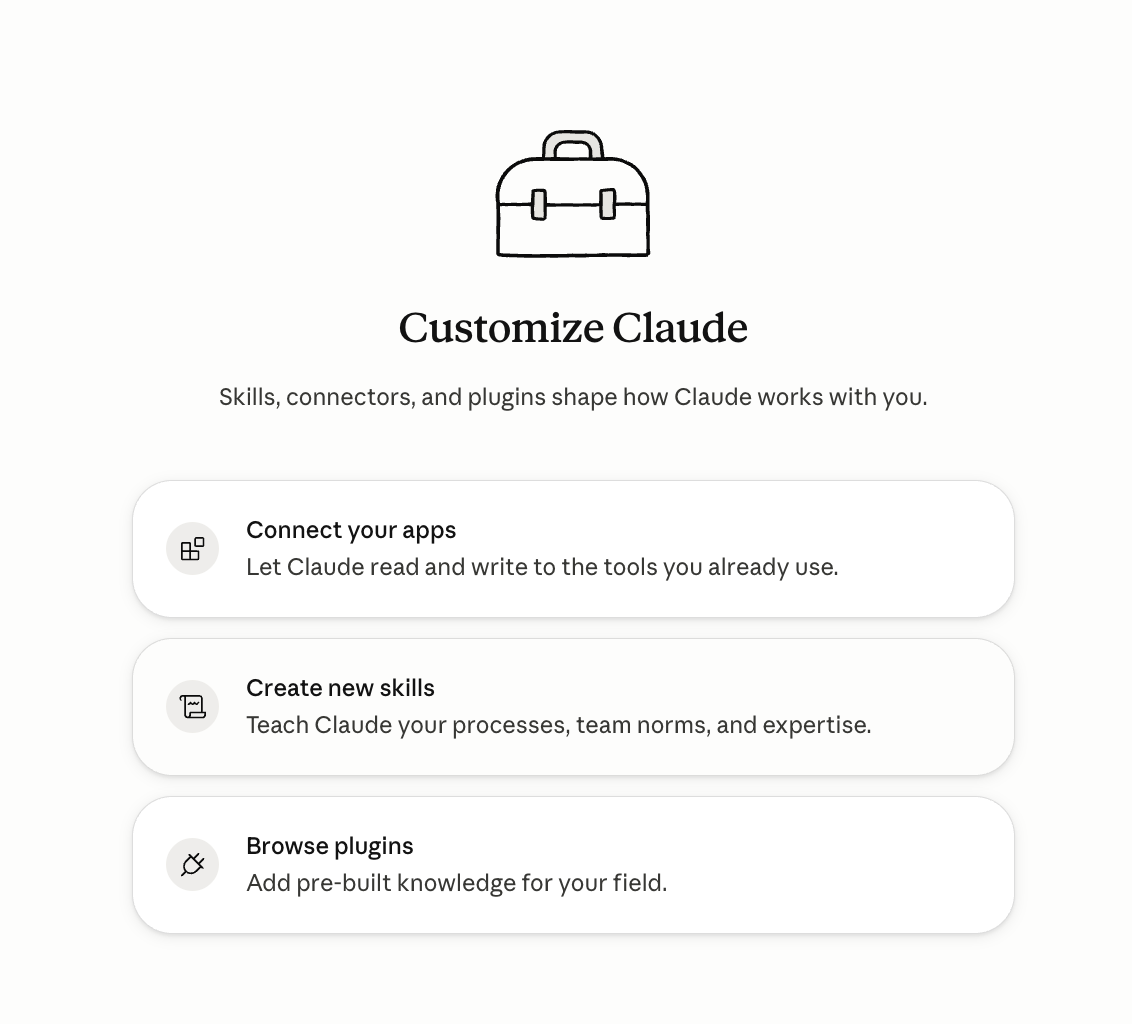
Open Claude Cowork and go to Customize. You will see the three ways to shape how Claude works with you: connect your apps, create new skills, and browse plugins.
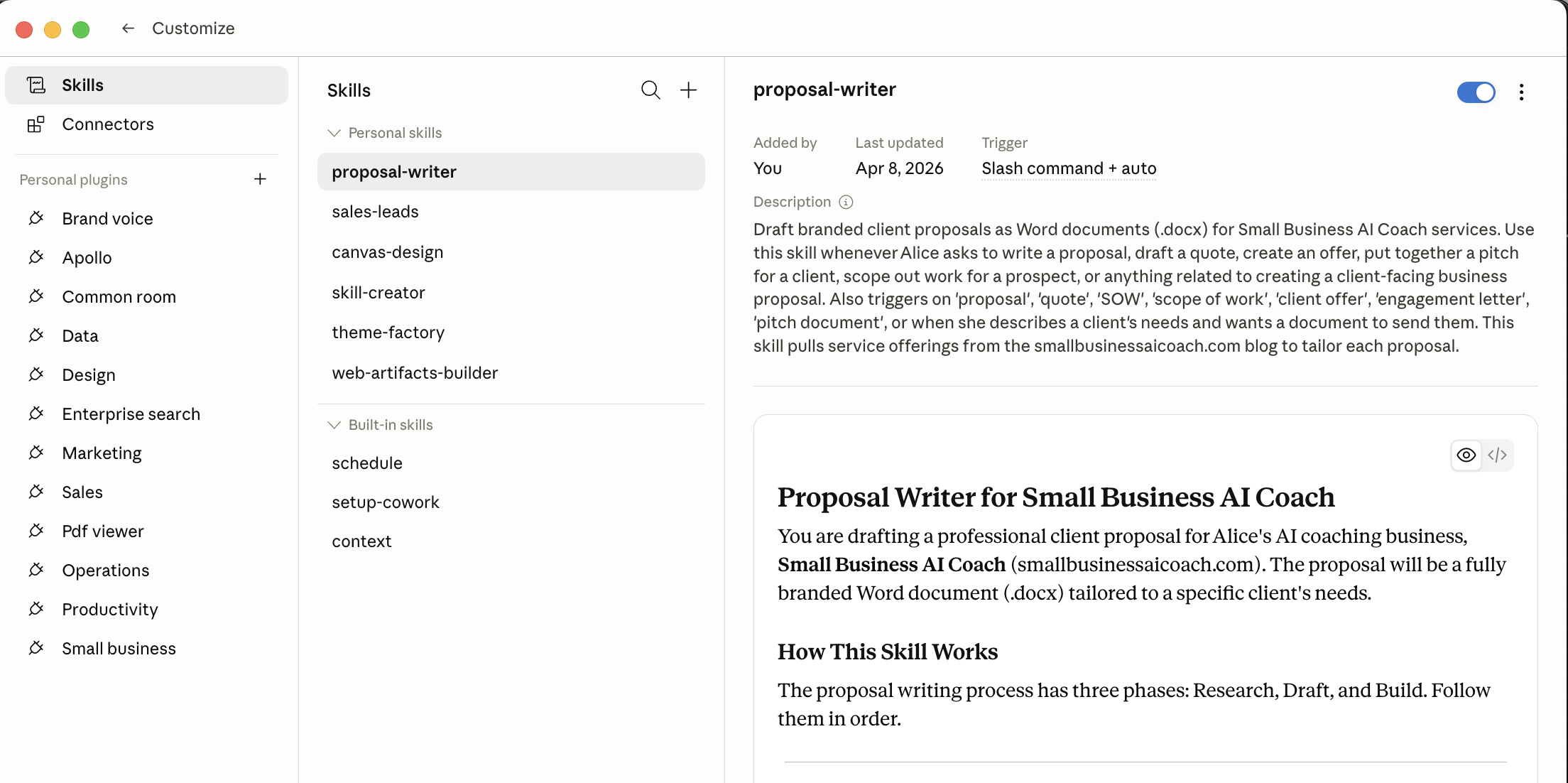
Click into Skills. Cowork already ships with Built-in skills (like schedule and context), and any Personal skills you have added sit right above them. Toggle on the one that matches the chair you need filled, and it is live.
Then hand it a real task, not a test. A decision you have been avoiding. Watch how different the output is when the expert is already briefed on how to think.
The gap-filling way: bring one in from GitHub, safely
When Cowork does not already have the expert you want, go get one. This is where the free library comes in.
1. Name your gap. Pick the one job Cowork is not already doing for you.
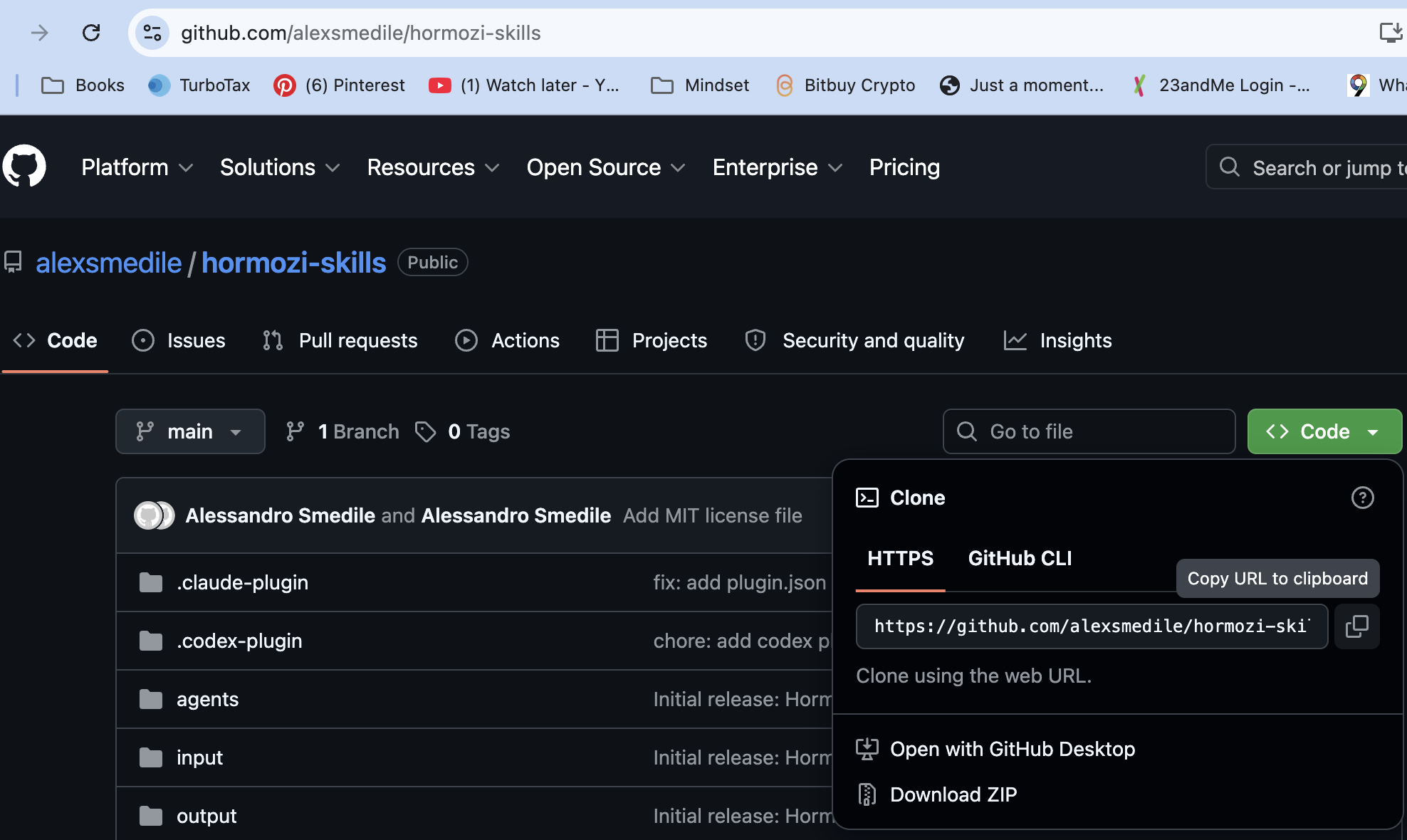
2. Find a skill for it and copy its link. Google "[that job] Claude skill," or browse the curated directory at github.com/ComposioHQ/awesome-claude-skills. Open the repo, click the green "Code" button, and copy the link.
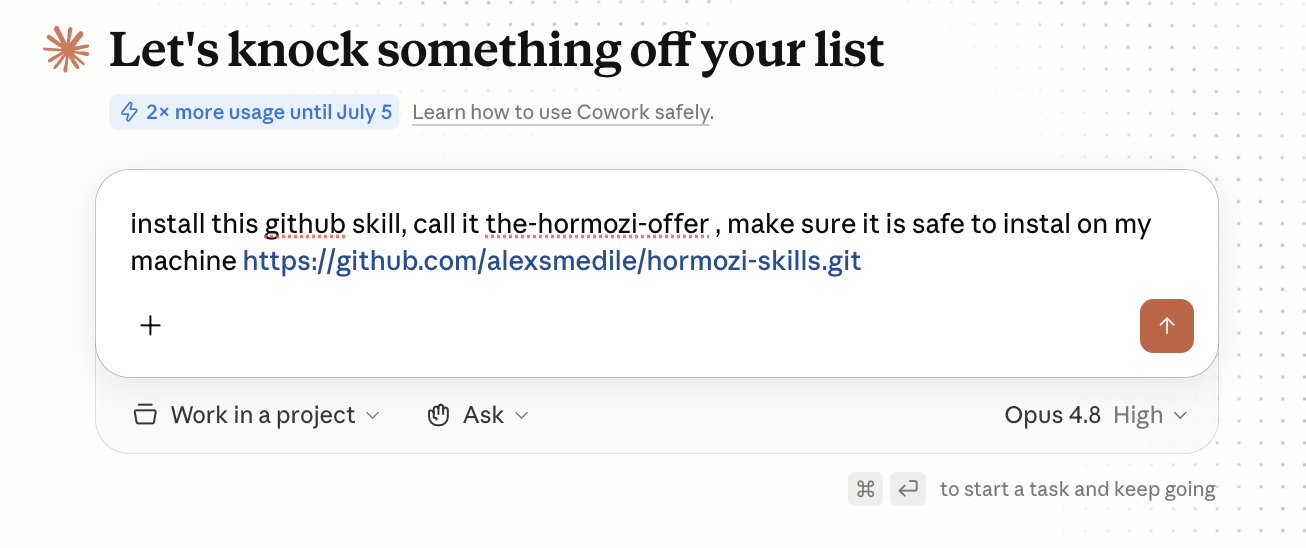
3. Let Claude install it AND check it for safety, in one breath. This is the step most people skip, and it is the most important. A skill is a set of instructions you are handing your AI, so you want to know what is inside before you trust it. In Cowork, paste the link and ask for both at once. Here is the exact prompt I use:
Install this GitHub skill, call it the-hormozi-offer, and make sure it is safe to install on my machine: https://github.com/alexsmedile/hormozi-skills.git
Claude reads the skill first, tells you what it does and what it touches, flags anything risky, and only then installs it. Want it even more thorough? Add: "Tell me exactly what files or data it touches and whether it sends information anywhere before you install."
4. Give it one real task. And next week, add the next chair. Build your board one expert at a time.
That safety check is the whole difference between using AI like a professional and using it like a tourist. It is exactly the habit I teach.
Can You Create Your Own Claude Skills?
Yes, and it is simpler than it sounds, which is why "how to create skills in Claude" is climbing in search.
A Skill is mostly a short instructions file that tells Claude how to behave for a certain job. If you have a process you repeat (the way you onboard a client, the way you write a proposal, the way you qualify a lead), you can capture it once as a Skill and have Claude run it your way every time. You are not coding. You are writing down how you think, so the AI stops needing the reminder.
This is where it gets powerful for owners. You can package yourself. Your judgment, your brand voice, your playbook becomes a Skill you can hand to your team so they work the way you would, or share with clients, or even turn into a product. The expert you spent years becoming stops living only in your head.
When you are ready to try it, I wrote a full walkthrough with videos: how to build your first Claude skill in 15 minutes.
"That is the real long game: a library of your business, and of you, taught to your AI."
The Honest Catch
An advisory board is only as good as the questions you bring it and the judgment you apply to the answers. Skills give you the talent. They do not give you the strategy, the context of your specific business, or the confidence to know which advice to act on. That part is still you, and it is exactly where most owners freeze.
That is the work I do with clients: figuring out which chairs your business actually needs filled first, what to feed each one, and how to turn AI output into a plan you can run.